
Introduction
AI-powered automation is transforming treasury operations by reducing manual tasks, improving forecasting accuracy, and enhancing decision-making. With today’s no-code and low-code tools, you can build a Treasury Copilot that automates key treasury functions without needing IT support.
This first guide combines structured AI strategies with a hands-on approach to building an AI Treasury Copilot, specifically focusing on Cash Flow Forecasting as an example.
1. Define the Scope & Objectives
Before building your AI Treasury Copilot, define the tasks it should automate. AI can enhance various treasury functions, including:
✅ Cash Flow Forecasting – Predict future cash balances using historical data and real-time inputs.
✅ Liquidity Management – Analyze bank balances, investments, and credit facilities.
✅ Payments & Reconciliations – Identify mismatches and anomalies in transactions.
✅ Risk Management – Monitor FX risks and market fluctuations.
✅ Treasury Reporting – Generate AI-driven reports with dynamic dashboards.
✅ Regulatory Compliance – Ensure adherence to financial regulations.
2. Choose Your AI Tools & Platforms
You don’t need to build AI from scratch. Instead, leverage existing platforms that offer AI capabilities:
Core AI Components
- Microsoft Copilot (Excel & Power Automate) – For AI-driven data analysis, automation, and reporting.
- ChatGPT (API or Custom GPTs) – For answering queries and analyzing treasury data.
- Power BI & AI Insights – For interactive dashboards and predictive modeling.
Automation & Integration Tools
- Power Automate – Connects Excel, emails, and banking platforms for workflow automation.
- Coupa Treasury AI & RPA – Automates treasury workflows.
- Zapier – Links multiple treasury tools for seamless integration.
- Python & Pandas – For advanced AI-driven financial analysis.
3. Data Sources & Integration
Your AI Treasury Copilot needs access to accurate financial data. Common sources include:
- Bank Statements – Retrieved via API or SWIFT connectivity.
- ERP Data (SAP, Oracle, Coupa) – Extracts treasury transactions and payment data.
- Market Data – Exchange rates, interest rates, and financial news via APIs (Alpha Vantage, Bloomberg).
- Spreadsheets & Reports – Data from Excel, CSV, or Google Sheets.
To integrate these sources, use:
- Power Query – For structured data imports.
- Python APIs – For financial data retrieval.
- RPA Bots – For scraping or automating file imports.
4. Automate Treasury Workflows with AI
Example: AI-Powered Cash Flow Forecasting
A practical use case of an AI Treasury Copilot is cash flow forecasting. Here’s how to build one without coding:
Step 1: Structure Your Cash Flow Data
Create an Excel file (“CashFlowData.xlsx”) with the following structure:
| Date | Bank | Opening Balance | Incoming | Outgoing | Closing Balance |
|---|---|---|---|---|---|
| 01/02/2025 | HSBC | 500,000 | 200,000 | 150,000 | 550,000 |
| 02/02/2025 | HSBC | 550,000 | 180,000 | 200,000 | 530,000 |
Save this file on OneDrive or SharePoint for automation access.
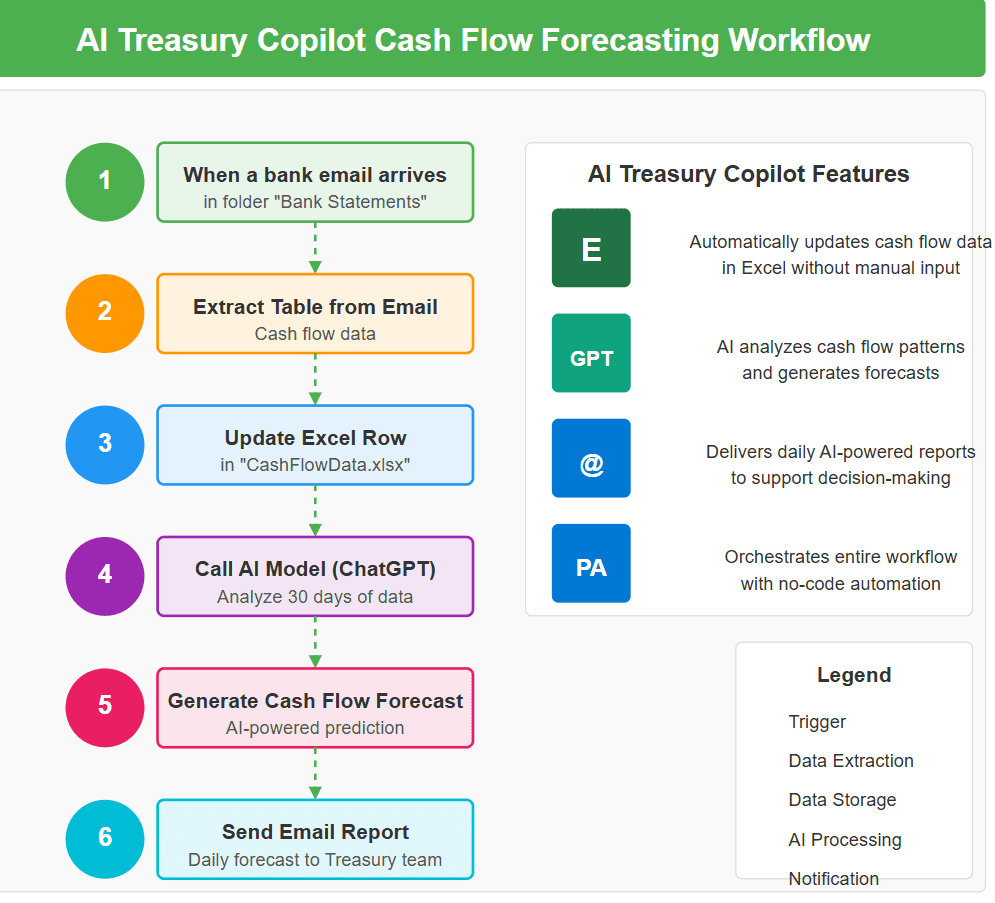
Step 2: Set Up an Automation in Power Automate (Cloud Flow)
Now, we’ll create a workflow to automatically update the Excel file with daily cash balances.
1️⃣ Go to Power Automate and select “Create” > “Automated cloud flow”.
2️⃣ Trigger: Choose “When an email arrives” (if your bank sends daily balance reports).
3️⃣ Action: Add “Extract Table from Email Body” to grab balance details.
4️⃣ Action: Add “Update Excel Row” to add the extracted data into your “CashFlowData.xlsx”.
✅ Now, your cash flow data updates automatically without manual input!
Step 3: Use AI to Analyze and Predict Cash Flow
Now that we have the data, let’s build an AI-powered forecast.
? Add ChatGPT to Power Automate
1️⃣ Go to Power Automate, create a new step, and select “HTTP Request”.
2️⃣ Choose “Call an AI model” and select GPT-based text analysis.
3️⃣ Send the last 30 days of cash flow data as input to ChatGPT.
4️⃣ Configure ChatGPT to generate a cash flow forecast summary like:
Example AI Output:
“Based on the last 30 days, your average daily cash inflow is $190,000, and outflow is $175,000. You are expected to have a closing balance of $520,000 by next Friday.”
✅ Now, AI is automatically analyzing cash flows for you!
Step 4: Automate AI-Generated Reports
1️⃣ Add “Send an Email” step in Power Automate.
2️⃣ Set the recipient as yourself or your team.
3️⃣ Paste the AI-generated forecast into the email body.
4️⃣ Schedule the flow to run every morning.
✅ You’ll receive an AI-generated cash flow forecast in your inbox daily.
Step 5: Interact with Your AI Treasury Copilot
Use Microsoft Copilot or ChatGPT for real-time cash flow insights.
- In Copilot in Excel, type: “Summarize the cash flow trends for the past 3 months.”
- In ChatGPT, upload the Excel file and ask: “What is the predicted cash balance in 2 weeks?”
✅ AI provides instant insights to assist decision-making!
5. Deploy & Optimize the AI Treasury Copilot
Deployment Options
- Excel & Power Automate – Best for quick automation.
- Power Apps – For a structured AI-powered treasury dashboard.
- Custom GPT – Train a ChatGPT model specifically for your treasury data.
Monitoring & Continuous Improvement
- Use Power BI dashboards to track AI performance.
- Refine AI rules based on user feedback.
- Test AI-driven forecasts against real-world data to improve accuracy.
Final Result
Your Treasury Copilot will now:
✅ Automatically collect cash flow data
✅ Predict future cash flows
✅ Generate AI-powered reports
✅ Allow you to ask cash flow-related questions anytime
If you found this episode valuable, don’t miss the next one here!
Treasury tech insights. No fluff.
One email per week. Build logs, tools, and opinions from the trenches.
Subscribe →